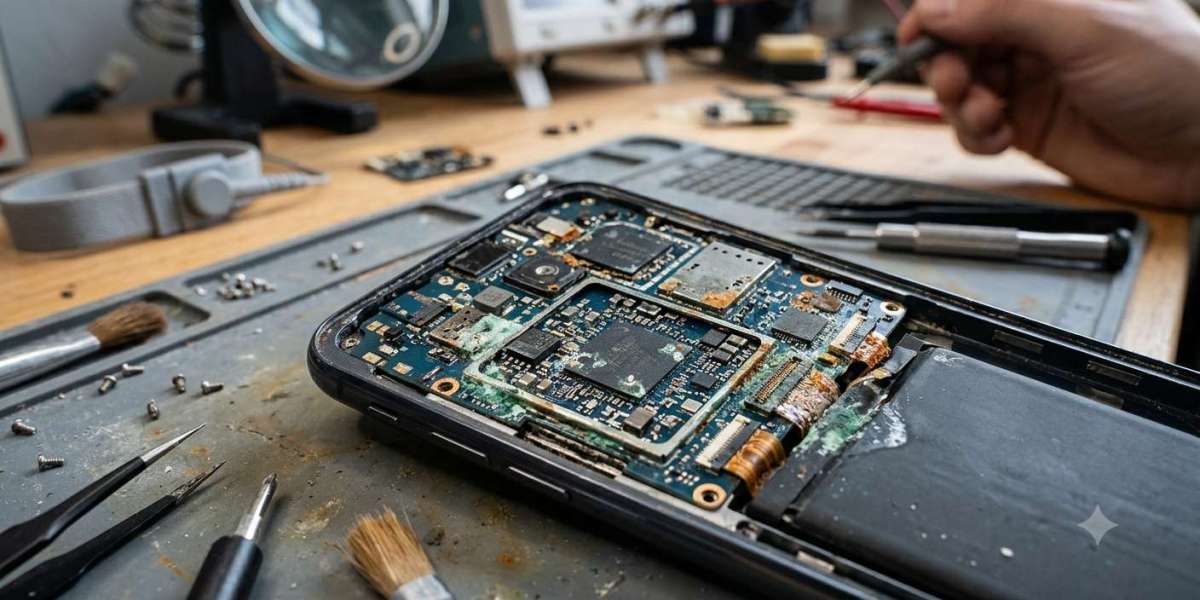

Many laptop owners assume that if their device continues working after a liquid spill, no serious damage has occurred. Unfortunately, this is one of the biggest misconceptions about water damage. While a laptop may seem to operate normally immediately after exposure to water, coffee, tea, or other liquids, hidden problems can develop gradually over the following days or even weeks. Moisture trapped inside the device can continue affecting delicate electronic components long after the surface appears completely dry.
Understanding these delayed effects is essential for protecting your laptop and avoiding expensive repairs. At iPC Repair Houston, technicians frequently inspect laptops that initially survived a liquid spill but later developed unexpected hardware failures. Whether your device also requires laptop screen repair Houston after an accidental drop or needs a complete liquid damage inspection, early professional service greatly improves the chances of preventing permanent damage.
Why Liquid Damage Doesn't Always Show Immediate Symptoms
When liquid enters a laptop, it doesn't always cause instant failure. Instead, moisture may settle in hard-to-reach areas where it slowly affects internal electronics over time.
Hidden moisture can remain around:
- Motherboard circuits
- Keyboard connectors
- Display cables
- Charging components
- Cooling fan assemblies
- Storage devices
Because these areas are enclosed inside the laptop, damage often progresses unnoticed.
Corrosion Continues Even After Drying
One of the most damaging long-term effects of liquid exposure is corrosion.
Although the visible liquid may evaporate within hours, minerals and contaminants left behind continue reacting with metal contacts.
Over time, corrosion may:
- Weaken electrical connections
- Interrupt data communication
- Damage circuit traces
- Cause components to fail unexpectedly
This gradual deterioration explains why problems sometimes appear weeks after the original spill.
Random Startup Problems
A laptop affected by delayed liquid damage may begin showing inconsistent startup behavior.
Common symptoms include:
- Failure to power on
- Repeated restart loops
- Black screen during boot
- Delayed startup
- Random shutdowns shortly after powering on
These issues often indicate that moisture has affected the motherboard or power management circuitry.
Keyboard Issues May Develop Slowly
Even if every key works immediately after the spill, residue left behind can eventually interfere with keyboard operation.
You may notice:
- Sticky keys
- Keys requiring extra pressure
- Multiple letters appearing at once
- Certain keys becoming unresponsive
These problems frequently worsen over time as corrosion spreads beneath the keyboard.
Charging Problems Can Appear Later
Liquid exposure can affect charging components without causing immediate failure.
Weeks after the spill, you may experience:
- Slow charging
- Battery not charging completely
- Intermittent charging
- Laptop only working while plugged in
Professional diagnostics help determine whether the battery, charging port, or motherboard has been affected.
Unexpected Overheating
Moisture and residue can reduce cooling system efficiency by affecting fan operation and restricting airflow.
As temperatures rise, your laptop may experience:
- Loud cooling fans
- Excessive heat
- Reduced performance
- Automatic shutdowns
Ignoring these symptoms can result in additional hardware damage beyond the original liquid exposure.
Storage Device Problems
Liquid damage can eventually affect the electronics controlling your SSD or hard drive.
Possible warning signs include:
- Missing files
- Slow file transfers
- Startup errors
- Operating system crashes
- Storage drive not being detected
Seeking professional assistance quickly improves the chances of protecting valuable data.
Display Issues That Develop Over Time
Moisture can gradually damage display cables and graphics-related circuitry.
Delayed display problems may include:
- Screen flickering
- Bright or dark spots
- Horizontal or vertical lines
- Color distortion
- Intermittent black screen
If the display becomes damaged, professional laptop screen repair Houston services allow technicians to replace defective screen components while checking for additional liquid-related issues throughout the laptop.
USB Ports and External Connections May Stop Working
The motherboard controls communication with external devices through USB ports and other connectors.
Corrosion may eventually cause:
- USB devices not being recognized
- External displays failing to connect
- Charging accessories malfunctioning
- Audio ports becoming unreliable
These symptoms often indicate that internal circuits continue deteriorating after the original spill.
Battery Performance Can Decline
Liquid exposure sometimes affects battery connectors or nearby power circuits.
Delayed battery symptoms include:
- Rapid battery drain
- Unexpected shutdowns
- Incorrect battery percentage readings
- Reduced charging capacity
Battery-related issues should always be professionally evaluated because they may involve multiple interconnected components.
Strange Noises or Burning Smells
A laptop that begins producing unusual sounds or odors weeks after water exposure requires immediate attention.
Potential warning signs include:
- Clicking sounds
- Buzzing noises
- Burning smell
- Excessively loud cooling fans
These symptoms may indicate electrical damage that has worsened over time.
Why Home Drying Methods Are Not Enough
Many people rely on air drying or placing the laptop in rice after a spill.
Unfortunately, these methods cannot:
- Remove corrosion
- Clean sticky residue
- Repair damaged circuits
- Eliminate moisture trapped beneath integrated components
Professional cleaning is essential for preventing long-term damage.
The Importance of Professional Liquid Damage Inspection
Even if your laptop appears to be functioning normally, professional inspection can reveal hidden problems before they become severe.
At iPC Repair Houston, technicians carefully disassemble the laptop, inspect every major component, remove corrosion, clean affected circuits, and perform detailed hardware diagnostics. This comprehensive evaluation helps identify developing issues before they lead to complete hardware failure.
If liquid exposure has also affected the display or caused accidental physical damage during the incident, screen repair Houston TX services can be completed during the same repair process, restoring both the appearance and functionality of your device.
Tips to Reduce Long-Term Damage After a Spill
If liquid reaches your laptop, taking the right steps immediately can improve the outcome.
Recommended actions include:
- Turn the laptop off immediately.
- Disconnect the charger.
- Remove connected accessories.
- Avoid pressing unnecessary keys.
- Do not attempt to charge the laptop.
- Arrange a professional inspection as soon as possible.
Quick action greatly reduces the risk of delayed hardware failures.
Conclusion
Liquid damage often creates problems that remain hidden long after the initial spill. Corrosion, charging failures, overheating, storage issues, keyboard malfunctions, display problems, and motherboard damage may develop gradually over several weeks, even if the laptop appears to function normally at first. Recognizing these delayed warning signs and seeking professional assistance early can prevent costly repairs and help preserve both your laptop and your valuable data.
Whether you need expert liquid damage diagnostics, dependable laptop screen repair Houston, or professional screen repair Houston TX services, iPC Repair Houston provides comprehensive repair solutions designed to identify hidden damage before it becomes permanent. Prompt inspection and preventive repairs can significantly extend the life of your laptop while protecting your important files and ensuring reliable performance for the future.